

In our experience working with enterprises and GCCs in deploying AI talent and solutions, all enterprise AI evaluations can be divided into two key parts:
– The business evaluation: Is this task worth automating, and which model fits it?
– The technical evaluation: Is the AI producing the right outputs, at volume, at cost, without breaking?
Quick note: This article covers the technical evaluation — what to test after you’ve decided to implement. For the organizational readiness questions and insights on the AI models themselves, please see:
- 16 Critical Questions That Enterprise Leaders Need To Ask For Enterprise AI Implementation
- GPT vs. Claude vs. Gemini: Which AI Models Are Enterprises Choosing
However, before you test anything at all:
What Even Is Enterprise AI Evaluation?
Putting AI models and solutions within workflows that simulate real enterprise environments. The goal? Test output quality, cost, speed, security, and compliance.
Essentially, any AI evaluation team should be able to answer two questions:
- What does this task look like when the AI gets it right?
- What does it look like when the AI gets it quietly wrong?
Why do this: demos don’t tell the complete story.
Sure, the output on demo datasets looks good.
But, if you’ve ever had a conversation with any AI tool, you would know AI models have a tendency to make up numbers when there’s no context to lift from.
It misquotes data by a few points. It rewrites code that wasn’t meant to be rewritten.
It refactors something that was working.
So, how do you catch these failures? That’s exactly what this article covers.
The Core Principles Of AI Evaluation For Enterprises
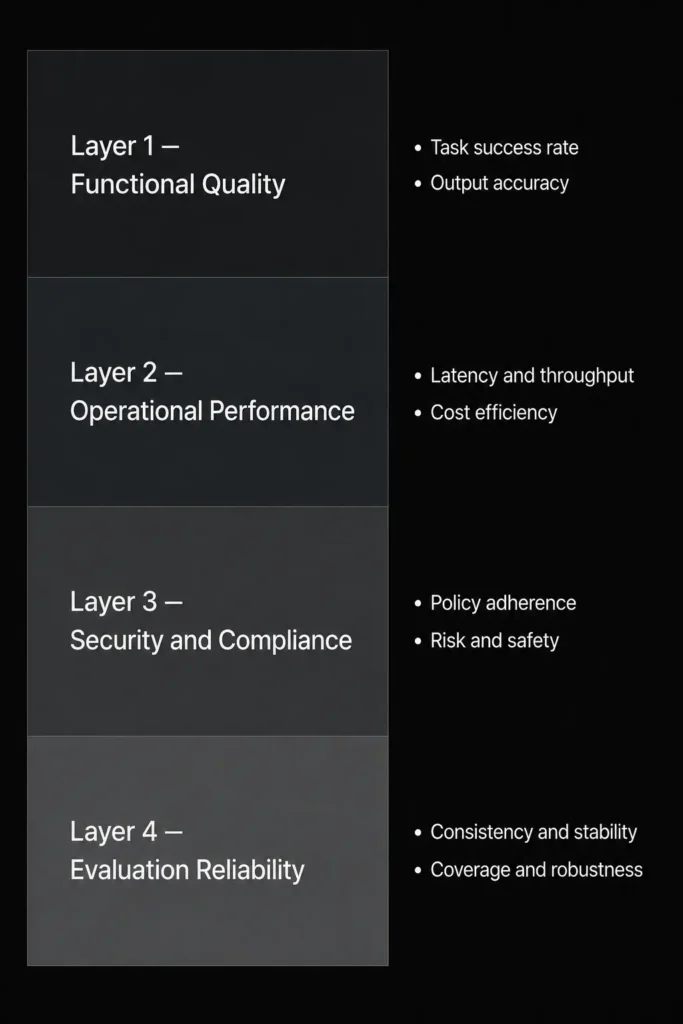
Layer 1: Functional quality
Does the model complete the specific task end-to-end on your data?
Not benchmark data. Your data.
An 89% MMLU score does not predict whether the model accurately extracts contract clauses from your vendor agreements or routes support tickets to the right team.
Three things to test at this layer:
Task completion rate.
Does the model complete the task fully, not just produce a response? The actual test: does the response satisfy the criteria the human reviewer would apply?
Hallucination frequency on your data.
Run queries against content the model cannot have seen — internal documents, proprietary data. A working proxy: if the model gives a confident answer to a question that has no answer in the source documents, it’s hallucinating. Track the rate across a representative sample, not just the easy prompts.
Output survival rate.
Of all outputs the model produces, what percentage survive to the final version without correction? If the team is rewriting half the output, the productivity gain is smaller than it looks on paper.
One pattern worth calling out: tech evaluations often fail on metrics, but human review says “it’s okay.”
This is a real trap.
If you accept outputs that fail your own criteria because they’re close enough, you’re calibrating down to the model rather than up to the standard.
Decide in advance what “close enough” actually means. Write it down.
Layer 2: Operational performance
A model that works in a prototype will fail under enterprise workloads if you haven’t tested for this.
Latency under load.
Time-to-first-token and total response time at your peak volume. Not the vendor’s average volume. Yours.
Cost per completed workflow.
Not cost per million tokens. Cost per completed task at your volume. If it takes a model 4 attempts to get a correct output compared to the more expensive one, you know the call to make.
Loops, retries, duplicate calls.
Agentic deployments get eaten up by unnecessary retries, duplicate API calls, and loops that don’t terminate cleanly. One user action can produce five internal API calls you didn’t know about. At scale, that’s five times the cost you forecast. Define retry limits and loop breaks before deployment, not after costs spike.
Expected Calibration Error (ECE).
The gap between confidence and accuracy. Imagine two AI models. Both are right 60% of the time, but one says, “I’m 95% sure,” and another, “I’m not sure.” You know which one’s more dangerous.High ECE in your specific domain means you need more aggressive human review checkpoints.
Layer 3: Security, governance, compliance
We’ve covered the full implementation security checklist in our enterprise AI implementation piece.
For evaluation purposes, these three questions matter first:
Where does your data go at runtime?
Not at contract signing. At runtime. What data does the model access, who configured that access, and has it been audited? Most organizations deploying AI in 2026 don’t have a complete answer to all three.
Does the deployment architecture match your regulatory requirement?
HIPAA, GDPR, India’s DPDP, RBI data localisation — default API configurations satisfy none of these. Compliance requires explicit contractual terms and architectural configuration. It is a design requirement, not a deployment checklist item.
Have you run adversarial tests?
Prompt injection, jailbreaks, proprietary data leaks. Not once at launch. On a recurring, automated basis.
And one that rarely appears in any checklist: can the agent stop itself? Autonomous agents without failsafe conditions can consume compute costs that no procurement cycle was built to absorb. Build the stop condition before you build the agent.
Layer 4: The LLM-as-judge problem
LLM-as-judge is the practice of using a larger model to test the outputs of your deployed model. It scales well and removes the manual review bottleneck.
The problem: an LLM judge can still have the same gaps as the model it’s grading.
A recent paper showed that LLM judges of the same model tree have a massive self-preference bias.
Meaning, unsatisfactory outputs can be marked satisfactory, at least 50% of the time.
Cross-family ensembling helps. But models overlap on training data and converge on training methods. The assumption of full independence between model families doesn’t hold.
Practitioners running this at scale put it plainly: 90%+ eval pass rates, hallucinated outputs in production anyway. The evaluator couldn’t catch what the generator got wrong. They learned from roughly the same data.
What actually works:
Put humans in parallel pipelines
Run deterministic checks with human reviewers checking if the outputs actually derive from the knowledge base. LLM judges usually are great for fluency, format, and tone. But deterministic checks? Humans, always.
Don’t use the same model family to evaluate itself.
If you’re running Claude for your main workflow, don’t use Claude to judge Claude. The agreement scores will look great. The blind spots will be shared.
Calibrate your judges against production outcomes over time. The calibration source needs to be independent from the evaluation source.
8 Questions Enterprise AI Evaluation Teams Should Be Able To Answer
1) Does it actually do the task?
Test on your data. Not the vendor’s demo data or a benchmark dataset.
Your actual prompts, your actual documents, your actual task.
A contract your legal team already reviewed.
Or a batch of tickets your support team already classified.
Then compare — not to a rubric, to the output your team produced.
What to measure:
For classification tasks
Ticket routing, document tagging, and fraud flagging — measure precision, recall, and F1 score.
Precision: when the model says something is X, how often is it actually X?
Recall: of all the actual X cases, how many did it catch?
F1 balances both. A model can look accurate while systematically missing the cases that matter most. F1 tells you that.
For generation tasks
Summarizing, drafting, answering questions — measure faithfulness (did it introduce information that wasn’t in the source?), answer relevancy (did it answer what was actually asked?), and semantic similarity to your gold standard outputs.
For agentic tasks — more on this in Dimension 6.
Scaling evaluation beyond manual review.
At 1,000 outputs a day, manual review breaks. LLM-as-a-Judge uses a second model — scored against your rubric — to automatically grade outputs against your gold standard. It’s not perfect. It’s the only thing that scales.
Where to run these tests before signing anything:
Evaluation tooling depends entirely on what you’re testing:
- Prompt/output quality → Braintrust, DeepEval, Arize Phoenix
- RAG pipelines → RAGAS, LangSmith
- Agentic workflows → Orq.ai, LangSmith with session-level tracing, Arize Phoenix
- Production monitoring → LangFuse, Datadog, OpenTelemetry
- Model comparison before signing → Bedrock, AI Foundry, Google AI Studio
2) Is the gold standard well defined?
A gold standard for AI evaluation purposes is the human-produced output that the AI is measured against.
An SME’s review vs. an AI engineer’s review is simply different.
Nuance is the keyword here.
How to build one? Pull 50–100 real examples from your actual workflow — they can be the same contracts your legal team reviewed or reports your analysts summarized.
These become your golden standard/benchmarks. All you need to do is get SMEs and engineers to compare both outputs.
Four things that make a gold standard usable:
– Both inputs and outputs should represent the full range of difficulty — easy, edge case, and genuinely ambiguous. A dataset of only easy examples will make every model look good.
– Each output needs a defined acceptance criterion. “The summary captures all material terms” is a criterion. “Good summary” isn’t.
– The dataset needs to be version-controlled. When the model updates, you rerun against the same dataset. If the dataset changes, you lose your baseline.
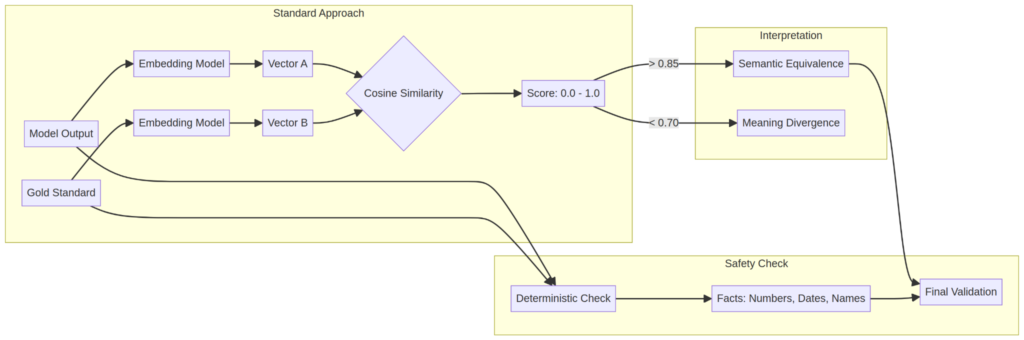
– Test for semantic similarity with humans-in-the-loop on any claim that involves a specific number, date, or named entity.
Why: Semantic similarity measures whether two outputs mean the same thing, not whether they use the same words. But semantic similarity catches meaning drift but misses factual errors.
A model’s output “the contract renews automatically unless cancelled 60 days prior” will score high on similarity against a gold standard that says “auto-renewal applies with 30-day cancellation notice.”
In our experience, 50 examples are enough to start. At production scale, you expand it as your task distribution shifts.
3) Will it hold up at volume, cost-wise and output-wise?
A model that works at 10 requests a day behaves differently at 10,000. Test at realistic volumes before you commit to an architecture.
Context window — how much text the model can hold in a single session before earlier content starts dropping out.
| Model | Context window | Roughly fits |
| Gemini 3.1 Pro | 2M tokens | ~1,500 pages |
| GPT-5.5 | 1M tokens | ~750 pages |
| Claude Opus 4.8 | 200K tokens | ~150 pages |
For most workflows, this doesn’t matter — RAG handles documents that exceed the window by pulling relevant content at query time. Where it matters: a 400-page vendor contract where a clause on page 140 modifies terms on page 22. A codebase where files reference each other across hundreds of files. Gemini 3.1 Pro is the only model that reads it all in one pass right now.
Latency
Measure Time-to-First-Token and total response time, but measure them under load, not in isolation. Enterprise SLAs don’t care about average latency. They care about what happens at the 95th and 99th percentile. What does your slowest 5% of requests look like when the system is at peak?
Throughput
Total queries handled per minute. Critical for any customer-facing deployment where multiple users hit the model simultaneously.
Model tier costs
Flagship models for reasoning-heavy, judgment-intensive tasks. Mid-tier for high-volume, repetitive work. Budget for narrow classification. The cost gap between tiers is significant. On the right task, the quality gap is negligible.
4) Is there an explanation regarding the output?
For most enterprise workflows, this is a compliance question.
If a model makes a hiring recommendation, a lending decision, or a medical triage call — you need to be able to explain why. Not to the developers. To a regulator, an auditor, a plaintiff’s attorney. “The AI decided” is not an audit trail.
What to evaluate:
Demographic parity
Does the model produce meaningfully different outputs for different demographic groups on the same input? For HR workflows, credit decisions, and anything touching protected characteristics, this isn’t optional.
Explainability
Can you trace a specific output back to the input that caused it? Can that trace be logged, retrieved, and presented if challenged?
Where this matters most: BFSI, healthcare, HR. In these environments, governance evidence isn’t an afterthought — it’s a product requirement.
Where it matters less: internal Q&A, content drafting, code generation. Lower stakes, lower scrutiny. Still worth logging.
Thinking of hiring for AI?
Hire AI engineers from India for AI teams in the US, UAE, and India through BEEU TECH
Built for enterprise hiring. Vetted AI engineers on remote basis from India, working in your timezone. A one-week paid trial comes first, you expand or scale down as the roadmap moves, and offboarding runs on 15 days notice.
- One-week paid trial
- Your timezone
- Transparent management
- 15 days notice to offboard
Deployment in as fast as 72 hours. Over six years placing tech talent with enterprise teams and GCCs.
5) Are there AI evaluation metrics?
“Accuracy” sounds like a metric. So does “performance.” Neither one tells you anything useful without context.
Here’s the mapping that works:
Metrics by Use Case
Select your AI application to highlight the metrics that matter most.
| Use Case | Metrics to Track |
|---|---|
| General chatbot | Answer Relevancy + Faithfulness |
| RAG application | Faithfulness + Contextual Precision + Contextual Recall |
| Customer support agent | Conversation Completeness + Conversation Relevancy |
| Coding agent | Tool Correctness + Answer Relevancy |
| Research assistant | Faithfulness + Hallucination Rate |
| Healthcare assistant | Faithfulness + Hallucination + Toxicity |
| Enterprise knowledge base | Contextual Recall + Faithfulness |
| Internal company copilot | Contextual Precision + Answer Relevancy |
| Multi-step agent workflows | Tool Correctness + Conversation Completeness |
| Safety-sensitive applications | Toxicity + Bias + Hallucination |
A few things worth noticing in this table:
Recall and relevancy matter as much as accuracy.
A model that’s technically correct but retrieves the wrong documents for your enterprise knowledge base fails the evaluation, even at 95% accuracy on a benchmark.
Hallucination metrics appear across multiple use cases, not just in research and healthcare.
Any time the model is generating answers from your internal data, you need to measure how often it invents versus retrieves.
The gap between those two numbers is your real risk.
Safety-sensitive applications need three metrics running simultaneously. One isn’t enough.
What works in practice:
Go live for testing in four weeks, but build modular structures against specific metrics from the start.
Not a global “is this good?” review.
Per-metric pass/fail per module. This is what keeps complete failure rates low.
6) Are agentic workflows being validated?
Evaluating a chatbot and evaluating an AI agent are different because they fail differently.
A chatbot gives you a wrong answer. You correct it and move on.
An agent gives you a wrong answer and then acts on it — calls an API, writes code to a production repo, updates a record, spawns a sub-agent to continue the task.
By the time you notice, the action is done. 🙂
Sometimes it’s reversible. Sometimes it isn’t.
What to validate before you deploy an agent:
Multi-step logic.
Does it complete the full task, or does it succeed at step 1 and silently fail at step 4? Single-step accuracy tells you almost nothing about agentic reliability.
Tool-call reliability.
When the agent calls an external API, does it pass the right parameters? When the API returns an error, does the agent handle it — or keep going as if nothing happened?
RAG retrieval accuracy.
When the agent pulls context from your internal data, is it pulling the right context? A model can generate excellent prose from the wrong document. Retrieval precision is a separate measurement from generation quality.
Agent failure recovery.
When something breaks mid-task, does it stop, escalate, or retry until it hits a token limit and a bill arrives?
Adversarial inputs.
What happens when a document the agent is processing contains instructions designed to override its behavior? What data does it expose when asked in an unexpected way? Red-team this before it goes anywhere near production.
The governance rule: the more autonomous the agent, the more governance you need in place before deployment. Spend caps per team. An approved allowlist of integrations. A human checkpoint before any agent action touches production. These aren’t bureaucratic overhead — they’re what separates a useful agent from an expensive incident.
7) Is there any ROI?
Token price is what vendors put on slide 3. But ROI?
Only revealed during evaluations.
The key players:
Full Total Cost of Ownership: token cost + infrastructure + integration engineering + human review overhead + prompt maintenance + governance tooling + the cost of rebuilding when a model gets deprecated.
Vs.
Returns: The key output of the AI implementation.
The agentic cost problem.
A basic chatbot conversation uses a few thousand tokens.
An AI agent working autonomously — searching, writing code, calling APIs, spawning sub-agents, running overnight — consumes tens of millions of tokens in a single session.
Uber exhausted its planned AI budget within months of 2026 starting.
By March, 84% of Uber’s engineers were classified as agentic coding users. Monthly AI spend per engineer averaged $150–$250.
Heavy users hit $500–$2,000.
In a Rapid Response interview, Andrew Macdonald said that despite 95% of Uber’s engineers using AI tools monthly and 70% of committed code now AI-generated, he can’t connect any of it to consumer-facing improvement:
“That link is not there yet… it’s very hard to draw a line between one of those stats and ‘okay now we’re actually producing like 25% more useful consumer features.'”
What the spending distribution actually looks like:
Ramp’s June 2026 data: the top 1% of US businesses spend $7,500 per employee per month on AI. The top 10% spend $611. The median business spends $11.38 — roughly one subscription seat.
The AI cost evaluation metric that matters.
Cost per million tokens is an input metric. Cost per completed workflow is an output metric. The second number tells you whether AI is actually cheaper than the process it’s replacing. That’s the number to track.
One note on billing: Anthropic’s seat-plus-token billing creates variable costs that are hard to forecast at scale. OpenAI’s tiered structure gives finance teams more levers. Factor billing predictability into your model before you sign.
8) Is there continuous monitoring?
The evaluation doesn’t end at launch.
Models drift.
Models get updated — sometimes without adequate notice.
Usage patterns change.
What passed evaluation in January may be failing quietly by June.
Here’s what you need to run:
Regression testing.
Every time a model is updated, run your top workflows through it before the update touches production. Model updates are not always backward-compatible. GPT-4 customers who didn’t track the deprecation timeline had to rebuild. That cost should appear in your procurement risk assessment before you sign.
Drift detection.
Your data changes. Your users’ prompts change. A model’s hallucination rate on your specific tasks can change after a provider update even if the benchmark scores improve. Measure output quality on a rolling basis, not just at launch.
Model deprecation monitoring.
Know the sunset roadmap for every model you build on. The question isn’t whether a model will be deprecated — it’s whether you’ll have six months’ notice or six weeks’.
The metrics that matter post-launch:
- Task completion success rate — is it finishing the task or producing partial outputs?
- Hallucination frequency on your tasks — not benchmarks
- Latency at the 95th percentile under peak load
- Cost per completed workflow
- Human review overhead — what percentage of outputs still need a human check?
- Agent failure recovery rate — when something breaks mid-task, what actually happens?
AI Evaluation Tools Worth Knowing
| Stage | What you’re testing | Right tool |
| Model comparison | Does this model outperform others on my data? | Amazon Bedrock, Azure AI Foundry, Google AI Studio |
| Prompt/output quality | Does this prompt reliably produce correct outputs? | Braintrust, DeepEval, Arize Phoenix (open-source) |
| RAG accuracy | Is retrieval pulling the right context? | RAGAS, LangSmith |
| Agentic workflows | Does the agent complete multi-step tasks reliably? | Orq.ai, LangSmith with session tracing |
| Production monitoring | What’s failing in production, at what cost? | LangFuse, Datadog, OpenTelemetry |
| Regression testing | Did the model update break anything? | Braintrust, DeepEval |
| Regulated industries | Fairness, drift, audit trails | IBM Watsonx, Arize |
Two things to verify before picking one:
Session-level evaluation matters for agents.
Most platforms give you query-level views. Agents need session-level analysis — what happened across the full interaction, not just at individual steps.
If your deployment involves multi-step agent workflows, check whether the platform supports session annotations and session-level scoring before you commit.
The methodology underneath matters more than the dashboard.
A 90%+ eval pass rate means nothing if the judge can’t catch what the model gets wrong.
Pair LLM evals with deterministic checks against your actual knowledge base.
The platform is just where you read the results.
What those results mean depends entirely on how you designed the evaluation.
The Final Word
The enterprises that are pulling ahead in AI are the ones that defined the task clearly, deployed within airgapped environments, measured what happened, and built the governance to expand from there.
Then kept measuring.
Building the team to run this? See how BEEU TECH works with enterprises on AI staffing and deployment ⇗