

In our experience designing, implementing, and deploying AI talent in enterprise teams, most enterprise AI implementations don’t always fail at the technology layer.
They can fail because the organization wasn’t ready for what the technology would surface, namely:
unstructured data, unclear ownership, a workforce that doesn’t know why AI is there or how to use it.
The industry evaluates AI models, vendors, and solutions on benchmarks.
Enterprises, however, should evaluate it on four things:
| Dimension | What it actually means |
| Purpose | Does this model do what you need it to do, for your specific use case? |
| TCO (Total Cost of Ownership) | Token price is the smallest part of your cost. What’s the full number? |
| Implementation Effectiveness | How does it connect to your systems? What does it touch? What breaks first? |
| Scalability | What happens at 10,000 requests per day? What’s the SLA? Who do you call? |
Here are the top questions to ask before implementing AI within enterprises:
- What are we actually going to use AI for?
- What happens when things just go wrong?
- Is our data ready for AI?
- Do we need to own the model — or is renting fine?
- Where will the AI run?
- What will Enterprise AI actually cost us?
- Are we designing the AI model architecture for flexibility?
- How will we bear the maintenance?
- Are we protected? Prompt injections and output-wise?
- What happens when providers deprecate AI models?
- Do our existing partners have influence?
- Can (and will) the AI actually follow governance rules?
- How locked in will we get?
- Can the workforce actually adopt AI?
- Is there a talent gap?
- Where to cut spend?
16 Critical Questions You Should Be Asking For Enterprise AI Implementations
Not “have we adopted AI?”
“What specific metric has AI helped us improve — and does our workforce know why we’re using it?”
The gap between those two questions is where most enterprise AI spend disappears.
1) What are we actually going to use AI for?
Most organizations still begin enterprise AI implementations start with questions like:
- “Should we use ChatGPT or Claude?”
- “Which model is smartest?”
- “Which provider is cheapest?”
But that doesn’t answer the question:
In our experience, they almost always start with one of three triggers:
Trigger 1 — Get answers faster:
Forecasting, summarizing data, drafting reports, and internal Q&A on company knowledge. Someone in leadership wants to reduce the time from data to decision. This is the most common trigger and the most mismanaged — teams reach for the most powerful model when a mid-tier one would do and significantly overpay.
Trigger 2 — Replace or upgrade a process:
Specifically: replacing rule-based RPA workflows with something that can reason, adapt, and handle exceptions at the edges. This is where the real enterprise value sits. It is also where the most number implementations go wrong.
Trigger 3 — Build something new:
A POC. An MVP. An internal tool that doesn’t exist yet. Speed matters more than perfection here. The goal is to prove a use case before committing to full deployment.
2) What happens when things just go wrong?
Ask before you sign: if this implementation fails, what happens to your data?
Many tools make onboarding simple. Exporting data or switching models later is where the friction lives.
Embeddings locked to a vendor’s format, output structures proprietary to one stack, fine-tuned weights you don’t own. These are lock-in mechanisms that look like configuration decisions.
Ask for the migration path. Ask what data you can export and in what format. If the vendor doesn’t have a clear answer, that is the answer.
AI doesn’t fix bad data. It produces confident output from it.
3) Is our data ready for AI?
Before you connect any model to any system, answer four questions:
Is it clean?
Consistent formatting. No duplicates. No missing critical fields. Standardize business definitions across departments first. Otherwise, the model produces different answers to the same question depending on which data it pulls from.
Is it classified?
Public, internal, confidential, restricted. Classification determines which deployment architecture is legally available to you. You can’t make this decision after the fact.
Is it mapped to the task?
Three years of support tickets is rich data — if tagged by resolution type, outcome, and root cause. Without that structure, the model has volume and no signal.
Are our data pipelines built for AI?
Traditional relational databases store structured data in rows and tables. AI — specifically RAG — needs a vector database alongside that: a store that converts your documents, emails, policies, and records into embeddings the model can search by meaning, not just keyword.
If your AI needs to answer from proprietary internal data, you need both layers working together.
What that looks like in practice:
| Data type | Where it lives | What AI needs to read it |
| Structured data — ERP, CRM, SQL databases | PostgreSQL, MySQL, Snowflake, Databricks | Direct DB connection or API — with access controls defining what the model can query |
| Unstructured data — documents, emails, PDFs, wikis | SharePoint, Confluence, Google Drive, S3 | Vector database (Pinecone, Weaviate, pgvector, Azure AI Search) + chunking pipeline |
| Real-time operational data | Kafka streams, data warehouses | Streaming connectors — model reads current state, not a stale snapshot |
Two more enterprise AI implementation decisions to make before connecting anything:
What can the AI actually read?
Not “what data do we have” — what specific tables, fields, and documents is the model permitted to access? This is an access control decision, not a data architecture decision. Define it explicitly. Agents without clearly scoped data access will read whatever they can reach.
What gets anonymized before it hits the model?
PII — names, national IDs, financial account numbers — should be masked or tokenized before any data enters a model call, regardless of deployment architecture. This applies to managed API, VPC, and on-premises equally.
Vendors will tell you your data is good enough. Get an independent read before you build anything on top of it.
4) Do we need to own the model — or is renting fine?
GPT-5.5, Claude Opus 4.8, and Gemini 3.1 Pro are closed-source. You rent access via API. You don’t control the model itself, the training, or when it gets updated or worse, discontinued.
Open-weight models — Meta Llama, Mistral, DeepSeek, Gemma (Google) — give you the actual model files. You can self-host them, train them further on your data, and run them without ongoing API costs. The tradeoff: you own the infrastructure, maintenance, and performance.
Most enterprises without a dedicated ML infrastructure team start with closed-source frontier models. Open-weight models make sense at very high volume, in environments requiring full data sovereignty, or where you have the engineering capacity to run them.
5) Where will the AI run?
Where your data is pulled from and where it goes determines everything about how the AI implementation happens:
| Option | What it means | Right for |
| Managed API | Queries go to the provider’s servers | Low-sensitivity workflows |
| Private cloud (VPC) | Model runs inside your cloud boundary. Data stays yours. | Customer data, financial records, source code, employee data |
| On-premises | Model runs on your hardware. Zero external transmission. | Defense, government, critical infrastructure |
None of the major providers configure this correctly by default in the first go.
This is your chance to correct that. Most deployments start with managed APIs.
Which is why you should always restrict database access within certain boundaries. Whichever deployment option you choose, the model still needs a path to your data. That path needs to be governed:
- Read-only by default. AI models should read data, not write to it, unless there’s a specific and audited reason to do otherwise.
- Scoped by role. The model an HR chatbot runs on should not have access to financial records. Scope database permissions to the task, not the team.
- No long-lived credentials in config files. Agents that store database credentials in environment variables or deployment configs are a security exposure. Use runtime credential injection — the model gets access at query time, not indefinitely.
- Audit every query. Log what the model read, when, and in response to what prompt. If something goes wrong, you need the trail.
For Indian enterprises implementing AI: DPDP 2023 covers any workflow processing Indian citizens’ personal data. RBI data localisation requirements add a layer for BFSI. All three providers support compliant configurations. Default deployments satisfy neither requirement. This is a design decision for day one, not a compliance checkbox at the end of procurement.
6) What will Enterprise AI actually cost us?
Token costs are the smallest part of your actual cost. The bigger number comes from what happens between calls.
Agentic deployments get eaten up by duplicate calls, unnecessary retries, and loops that don’t terminate.
One user action can produce five internal API calls you didn’t know about.
At scale, that’s five times the cost you forecast.
Define exactly what counts as a billable event with the vendor, before any agentic deployment.
Then model that against your expected workflows at realistic volume, not the vendor’s case study volume.
The cost that kills most enterprise AI implementations isn’t the model cost. It’s the orchestration cost. The wrapper around the model.
Thinking of hiring for AI?
Hire AI engineers from India for AI teams in the US, UAE, and India through BEEU TECH
Built for enterprise hiring. Vetted AI engineers on remote basis from India, working in your timezone. A one-week paid trial comes first, you expand or scale down as the roadmap moves, and offboarding runs on 15 days notice.
- One-week paid trial
- Your timezone
- Transparent management
- 15 days notice to offboard
Deployment in as fast as 72 hours. Over six years placing tech talent with enterprise teams and GCCs.
7) Are we designing the AI model architecture for flexibility?
Choosing a model is one decision. Choosing an architecture is a different — and harder — one. Model decisions can be revisited. Architecture decisions compound.
The enterprise AI stack has six layers — the model is one of them:
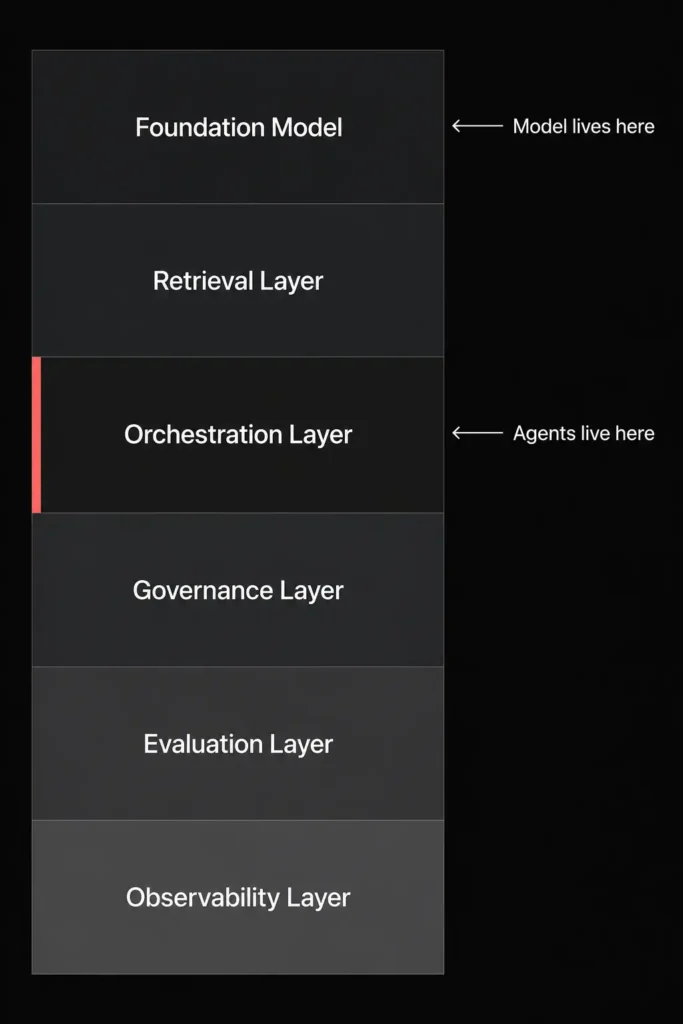
| Layer | What it does | Tools |
| Foundation model | Reasons, writes, generates | GPT-5.5, Claude Opus 4.8, Gemini 3.1 Pro, Llama 3, Mistral |
| Retrieval layer | Pulls relevant content from your internal data at query time — so the model answers from your data, not just its training | Azure AI Search, Pinecone, Weaviate, Elasticsearch |
| Orchestration layer | Coordinates the model’s actions across tools, systems, and multi-step tasks. This is where agents live. | LangChain, LlamaIndex, Vertex AI Pipelines, MCP |
| Governance layer | Who can use what. What gets logged. What gets blocked. | Microsoft Purview, Okta, AWS IAM, Anthropic Admin Console |
| Evaluation layer | Tests whether the model is actually right — not just fluent | LangSmith, Braintrust, DeepEval, RAGAS |
| Observability layer | Real-time monitoring of cost, failures, and usage | Datadog, Grafana, OpenTelemetry |
If you’re choosing an AI model from an implementation partner, you should be able to swap the foundation model and keep everything else.
37% of enterprises now use five or more AI models across their organization.
Different models for different tasks, different providers for different risk tolerances, different tiers for different volumes.
The retrieval (pulling the data) and orchestration (getting AI agents to talk to each other are way less modular.
Which means the model selection decision is more portable than most enterprises treat it. The orchestration and retrieval layer decisions are less portable than most enterprises realize.
You may think, isn’t this where RPA tools fit? Yeah, UiPath, Automation Anywhere, ServiceNow — these automate tasks by following fixed rules. They’re reliable for predictable, structured work.
But they don’t really have inbuilt judgements. So, what happens when you put an AI model behind an RPA workflow?
The model handles judgment calls and edge cases, and the RPA tool handles execution.
Claude Opus 4.8 via MCP is specifically built for this integration pattern.
8) How will we bear the maintenance?
No AI model is maintenance-free. The real question is how much you’re parenting it.
Every model update changes behavior.
A workflow you tuned carefully in January may produce different outputs in April on the same prompts. The vendor calls it an improvement. Your QA team calls it regression. Build regression tests for your top five workflows before you go wide. Run them after every model update.
UI matters more than most technical evaluations account for.
Users want AI to integrate everywhere. But their data is unstructured, spread across hundreds of microservices.
The evaluation needs to account for the friction between the model’s capabilities and the actual data environment it will operate in.
Demo data is curated. Production data is not.
9) Are we protected? Prompt injections and output-wise?
Test your agents against prompt injection before deployment and on a recurring basis afterward.
Users can craft inputs that redirect agent behavior. Outputs can be manipulated mid-retrieval.
If you’re running customer-facing agents, the attack surface can be just about every user interaction.
One approach that works: run a separate cloud server with a copy of your system data.
Have the agent operate against that copy, not production.
Test boundary conditions: what happens when input is intentionally malformed, context is missing, or the agent encounters an unexpected situation?
If it fails loudly, that’s manageable. If it fails silently and confidently, that is a production risk.
10) What happens when providers deprecate AI models?
Models get updated without notice. Behavior changes. The output your team approved during evaluation may not match what ships six months later.
Check the vendor’s version pinning policy before signing. Can you pin to a specific version? What is the deprecation notice period? What happens to your fine-tuning if the base model is retired?
OpenAI’s GPT-4 customers already lived this. Plan for it regardless of which provider you’re on.
11) Do our existing partners have influence?
Most enterprises choose AI models based on what their implementation partners recommend.
This is neither good nor bad. It’s just true, and naming it explicitly is more useful than pretending the evaluation was neutral.
And the key benefit is integration with existing ecosystems that their partners have running within the org.
Which is exactly what the biggest players in AI (read: providers) have realized:
Anthropic committed $100 million to the Claude Partner Network in 2026. More than 40,000 firms applied for the program. Over 10,000 consultants have earned a Claude certification.
The Accenture Anthropic Business Group is training 30,000 Accenture professionals on Claude.
The TCS partnership puts Claude in front of 50,000 TCS employees across 56 countries.
EPAM is building a dedicated practice of more than 10,000 Claude-certified architects.
Google committed $750 million at Google Cloud Next 2026 to its 120,000-member partner ecosystem. The GEAR program is training a million developers specifically to build for the Gemini marketplace.
And secondly — GitHub Copilot, the single most-used coding seat in enterprise, lets organizations enable Claude, GPT, and Gemini models underneath the same interface.
GitHub’s own documentation confirms Copilot is backed by all three labs simultaneously, with org admins choosing which to turn on.
For enterprises with deep Microsoft stack dependency, this is the path of least implementation friction.
The implication on your enterprise AI implementation?
If your SI is Accenture, TCS, or EPAM, Claude is easier to implement.
If you’re Azure-heavy, Copilot with GPT is the path of least resistance.
If you’re Google Cloud-native, Gemini Enterprise and Vertex AI are the natural entry points.
None of these are wrong answers. “We chose this model because our partner knows it best” is a legitimate procurement reason.
However, for the model-by-model breakdown — capabilities, pricing, benchmarks, enterprise security—see our GPT vs Claude vs Gemini comparison.
12) Can (and will) the AI actually follow governance rules?
Deloitte’s 2026 State of AI in the Enterprise report — surveying 3,235 senior leaders across 24 countries — found that worker access to AI rose 50% in 2025, but only 34% of organizations are truly reimagining their business with it. The other 66% are using AI tools with little to no change to existing processes. They’re governing retroactively — reacting to incidents instead of preventing them.
The minimum before you go to production:
- SSO/SAML enforced org-wide — no personal accounts accessing company AI tools
- RBAC – role based access controls – so your only approved employees can access and act on data
- SCIM provisioning — AI access revokes automatically when someone leaves
- Data classification complete before connecting AI to any data source
- SOC2 and NIST-aligned standard audit trails and regulatory compliance
- Zero-retention contracts signed with every provider
- Audit logging into your SIEM from day one
- Spend caps per team before any agentic tools go live
That last point matters more than most finance teams realize until it’s too late.
An AI agent working autonomously consumes tens of millions of tokens in a single session. Ramp’s June 2026 AI Index — drawn from 70,000+ US businesses — shows the top 1% of companies spending $7,500 per employee per month on AI.
The median spends $11.38. The jump happens fast, almost always in engineering teams running agentic coding tools, almost always without a spend cap in place.
13) How locked in will we get?
Everyone talks about model lock-in. The expensive forms are the ones nobody names until they’re inside them.
Orchestration lock-in. Agent workflows built on a vendor’s proprietary syntax. You can’t move them without rebuilding. MCP — now under Linux Foundation stewardship — is the open-standard alternative. Build on it where possible.
Data lock-in. Your RAG knowledge base, fine-tuning datasets, vector embeddings stored in vendor infrastructure with no guaranteed export path. Often the largest single investment in an AI program.
Governance evidence lock-in. Audit logs stored in the vendor’s console. Migrate providers and you may lose the compliance trail. Keep your own copies from day one.
Organizational knowledge lock-in. Your team’s expertise is built around one vendor’s stack. Switching isn’t just a technical cost — it’s retraining everyone who’s learned the platform.
14) Can the workforce actually adopt AI?
Technology adoption and workforce adoption are not the same thing.
A tool deployed to 10,000 employees is not a tool used meaningfully by 10,000 employees. The gap between those two numbers is where AI ROI actually lives.
Deloitte’s research found that 55% of non-technical workers are open to exploring AI, but only 13% are actively enthusiastic. That’s not a hostile workforce — but it’s also not one that will self-adopt simply because you rolled out a tool.
Questions worth answering before you roll out:
Does every level of the org know why AI is there? Not the press release version. The specific version: “AI handles first-level ticket classification so the support team can focus on escalations.” Without that specificity, adoption stays performative.
Do people know how to use it effectively? Prompting well is a skill. Most organizations deploy AI tools and assume employees will figure it out. They find the minimum viable version and stop there.
Are you tracking meaningful use or just logins? Logins tell you who opened the tool. Not whether it changed how they worked.
Is there awareness about what AI can’t do? The most expensive failures aren’t from bad models — they’re from employees over-trusting outputs because nobody told them the model hallucinates, makes up numbers, and sounds confident doing it.
15) Is there a talent gap?
No tool closes this one.
Every enterprise AI implementation needs three things technology can’t provide:
People who understand the model. Mainly two types, people who support the AI talent and then the AI-native practitioners who recognize failure modes, fine-tune the model, and catch outputs that look right but aren’t.
People who understand the business process. The model optimizes for what you tell it to. If the person defining the task doesn’t understand the process deeply, the model optimizes for the wrong thing — at scale, efficiently.
People who connect both. Part analyst, part engineer, part translator. They’re the reason a deployment stays in production six months after launch. Also the scarcest people in the market right now.
If you don’t have these three internally, this is the gap to close before deployment — not after.
16) Where to cut spend?
Not all AI spend is equal. A lot of it is noise.
Cut: Flagship models running tasks mid-tier models handle equally well. Agentic tools deployed without spend caps. Seats for teams that haven’t been trained. Tools solving problems that don’t exist at meaningful scale.
Keep: Narrow deployments with clear task definitions, measurable outcomes, and someone accountable for the numbers.
We’ve already shown how there’s a gap of about $7000 between the average and the top 1% of AI users in organizations. But none of it matters if there’s no significant difference in output.
Some market intelligence regarding enterprise AI effectiveness
The assumption most enterprise buyers walk in with is a bit off.
The default justification for enterprise AI investment goes something like this: AI replaces or augments human labor, so the cost is offset by reduced headcount or higher productivity.
But here’s something Nvidia VP Bryan Catanzaro stated publicly:
“For my team, the cost of compute is far beyond the costs of the employees.”
Catanzaro, vice president of applied deep learning at Nvidia, made the remark in a conversation with Axios in April 2026.
The statement has since been corroborated by enterprise finance data:
Ramp’s platform shows the average monthly AI token spend across its customers has increased 13x since January 2025, with the biggest AI spenders seeing costs jump 50% or more roughly once every four months.
Uber CTO Praveen Neppalli Naga confirmed to The Information that the company had already exhausted its planned AI budget just months into 2026, driven by a surge in Claude Code adoption across its engineering teams.
Monthly AI spend per engineer ranged from $150 to $250 on average, with heavy users spending between $500 and $2,000.
This is not an isolated incident, however.
A Goldman Sachs survey of large companies found many are overrunning their AI budgets by orders of magnitude.
KPMG estimates businesses will nearly double their AI spending within the next year, averaging more than $200 million.
And Gartner’s own economist was blunt:
“Unconstrained deployments of these more advanced AI tools, like agents — it’s not a viable strategy for adoption.”
The mechanism is straightforward once you understand how agentic AI is billed.
A basic conversation with a chatbot uses a few thousand tokens.
An AI agent running autonomously in the background—searching the internet, writing and testing code, analyzing documents, spawning sub-agents, working overnight — can consume tens of millions of tokens in a single session.
The New York Times reported that an Anthropic employee ran up a Claude Code bill of $150,000 in a single month, while an OpenAI engineer processed 210 billion tokens in a single week.
The engineering community has a name for this: tokenmaxxing.
Jensen Huang accelerated the conversation at GTC 2026 when he suggested engineers should receive token budgets worth roughly half their base salary.
His math: a $500,000 engineer should be consuming at least $250,000 in tokens annually.
“If that engineer did not consume at least $250,000 worth of tokens, I am going to be deeply alarmed.”
Venture capitalist Tomasz Tunguz of Theory Ventures puts a top-quartile software engineer at $375,000 in salary, plus $100,000 in annual token costs — a fully loaded cost of $475,000, where over 20% of total compensation now comes from AI usage.
The counterweight to all of this is an MIT study that found a more uncomfortable truth:
AI automation is strictly more cost-effective than human labor in only about 23% of tasks currently.
In the remaining 77%, humans are still cheaper.
What this means for your enterprise AI implementation:
- The ROI case for AI is real — but it is use-case specific, not universal
- Agentic deployments (the highest-value use cases) are also the highest-cost ones
- Ungoverned agent usage is a budget liability, not just a security risk
- The model you choose affects billing predictability: Anthropic’s seat-plus-token billing creates variable costs that are hard to forecast at scale; OpenAI’s tiered model structure and flex pricing options give finance teams more levers to control spend
- Token efficiency per task — not token price per million — is the metric that determines your actual cost
How to go from evaluation to AI implementation
| Phase | What to do | What breaks if you skip it |
| Weeks 1–2 | Audit every AI tool in use — sanctioned or not. Classify workflows by data sensitivity. | You govern a shadow stack you don’t fully understand. |
| Month 1 | Deploy one tool inside your existing stack. Human review on every output. No autonomous agents yet. | No baseline. No way to know if anything is actually improving. |
| Months 2–3 | Build spend caps, retrieval quality baseline, approved integration list, regression tests for your top five workflows. Then expand. | Costs explode. Quality degrades. Prototypes never reach production. |
Your Evaluation Sequence
Three phases. Expand each to see what to do. Mark phases complete as you go.
How to ensure you’re on the right track in your enterprise AI implementation?
Start with the task
One-third of AI pilots make it to profitable production.
In many cases, enterprises build backwards — fitting the task to the model rather than the model to the task.
So, here are four questions to anwer them before you even decide on an AI model:
- What is the input?
- What does a correct output look like?
- How do you verify it’s correct — and who does that verification?
- What does failure look like for the specific task you want to automate?
That last question is the one that gets skipped. A contract clause that doesn’t exist. An HR policy number that’s 18 months out of date, delivered confidently to 4,000 employees. Code that refactors a function it didn’t fully understand.
These aren’t hypotheticals — they’re the reasons production AI deployments fail quietly before anyone notices.
Clean your data first
AI doesn’t fix bad data. It produces confident output from it.
Here’s how it usually goes: a model trained on clean, well-labeled internal data behaves very differently from the same model running on inconsistently formatted, incomplete, or mislabeled enterprise data.
The model won’t tell you the data is bad. It’ll answer anyway.
Three questions that tell you whether your data is ready:
Is it clean? Consistent formatting. No duplicate records. No missing critical fields. This is the floor, not the ceiling.
Is it classified? Public, internal, confidential, restricted. You need this before connecting any AI to any data source — because the classification determines which deployment architecture is even legally available to you.
Is it mapped to the task? Three years of customer support tickets is rich data. If those tickets aren’t tagged by resolution type, outcome, or root cause, the model has no signal. You have volume without structure.
Get someone who understands your data involved at this stage — not to run the evaluation, but to tell you whether the foundation is solid enough to build on. Vendors will tell you your data is good enough. They’re almost always wrong about this, and they won’t be the ones rebuilding when it breaks.
Map your use cases before you touch a model
Match the task to the model tier. Add the verification column — if you can’t fill it in, the task isn’t ready.
| Task | Model fit | How to test | How to verify |
| Summarizing long reports | Claude Opus 4.8 or Gemini 3.1 Pro | Give it a report your team already summarized. Compare. | Does it match on key points? What did it miss? What did it invent? |
| Writing proposals and first drafts | Claude Opus 4.8 | Feed it a past brief. | Does the output need less editing than a junior writer’s draft? |
| Contract and document review | Claude Opus 4.8 or GPT-5.5 via Azure | Run a contract your legal team already reviewed. | Did it catch the same issues? Did it miss anything material? Did it add anything that wasn’t there? |
| Code — writing and debugging | Claude Code | Give it a real ticket from your backlog. | Does it produce working code? Does it pass your test suite? What did it break? |
| Internal Q&A — HR, IT helpdesk | GPT-5.5 or Gemini 3.1 Pro | Ask it the 10 questions your helpdesk gets most. | How many does it get right? How many does it get confidently wrong? |
| Classifying or routing tickets | Gemini 3 Flash or GPT-5.5 mini | Run 100 past tickets through it. | Compare against your team’s actual routing decisions. |
| RPA workflows needing judgment | Claude Opus 4.8 via MCP | Replace one rule-based workflow. | Does it handle the edge cases the rule couldn’t? What does it do when it genuinely can’t? |
One rule on model selection: the right model is the smallest one that produces acceptable output on your task. Running a flagship model on a classification task that a budget model handles equally well is one of the most consistent sources of AI budget overrun.
Ensure there is a specific owner for AI decisions inside your organization
Most enterprises have nobody whose job it is to decide which AI goes where, who can use what, what gets approved for production, and what happens when something breaks.
Decisions get made by whoever cares most. Which means they get made inconsistently, at different risk tolerances, with no central visibility.
Three org models:
Centralized. One AI team owns all model decisions, procurement, governance. Slow. Coherent. Works for enterprises early in adoption where discipline matters more than speed.
Federated. Each business unit runs its own AI experiments with central guardrails. Moves fast. High risk of shadow spend and inconsistent governance.
Hybrid. A central platform team owns infrastructure, security, and approved model lists. Business units own use case design and deployment within those guardrails. Most mature organizations end up here.
What the operating model needs to cover — regardless of structure:
- Who approves new use cases before production
- Who owns and updates the approved model list
- Who reviews audit logs and at what cadence
- Who monitors model deprecation timelines
- What the escalation path is when an agent produces a damaging output
The shadow AI problem. Most enterprises have significant unsanctioned AI spend that never appears on a provider dashboard. Employees are using personal ChatGPT accounts, running Claude in the browser, experimenting with tools IT doesn’t know about. Know what’s running before you add more.
How to vet AI solutions providers
Vendor Evaluation Checklist
Work through this before contracting with any AI vendor. Not as paperwork — as the actual conversation.
The question that keeps the whole thing honest
Six months after deployment, ask:
“How much time are we spending refining AI processes versus using AI to do real work?”
If the answer is mostly refining — the implementation got ahead of the foundation.
Go back to the data. The governance. The people.
Ready to evaluate specific models? Read: Comparing GPT, Claude, and Gemini head to head.
Need the people to make this work? See how BEEU TECH builds AI-ready teams.